Building a CDN from Scratch
Content Delivery Networks, or CDNs, are a standard building block of modern web infrastructure. If you’ve ever set up a website, you’ve probably enabled one without thinking too hard about it. They make your site faster, and that’s about as much as most people need to know about them.
But there’s a lot of complexity hiding under the surface. I went down a rabbit hole trying to understand how CDNs actually work, and found it surprisingly satisfying. This article details my explorations into how CDNs work, as well as my implementation of a toy CDN that I built from scratch.
How CDNs work
The motivating idea behind a CDN is pretty straightforward. If you want to serve users that live all over the world, your site needs to be fast even for people who live very far away from your server. Let’s make this concrete with an example.
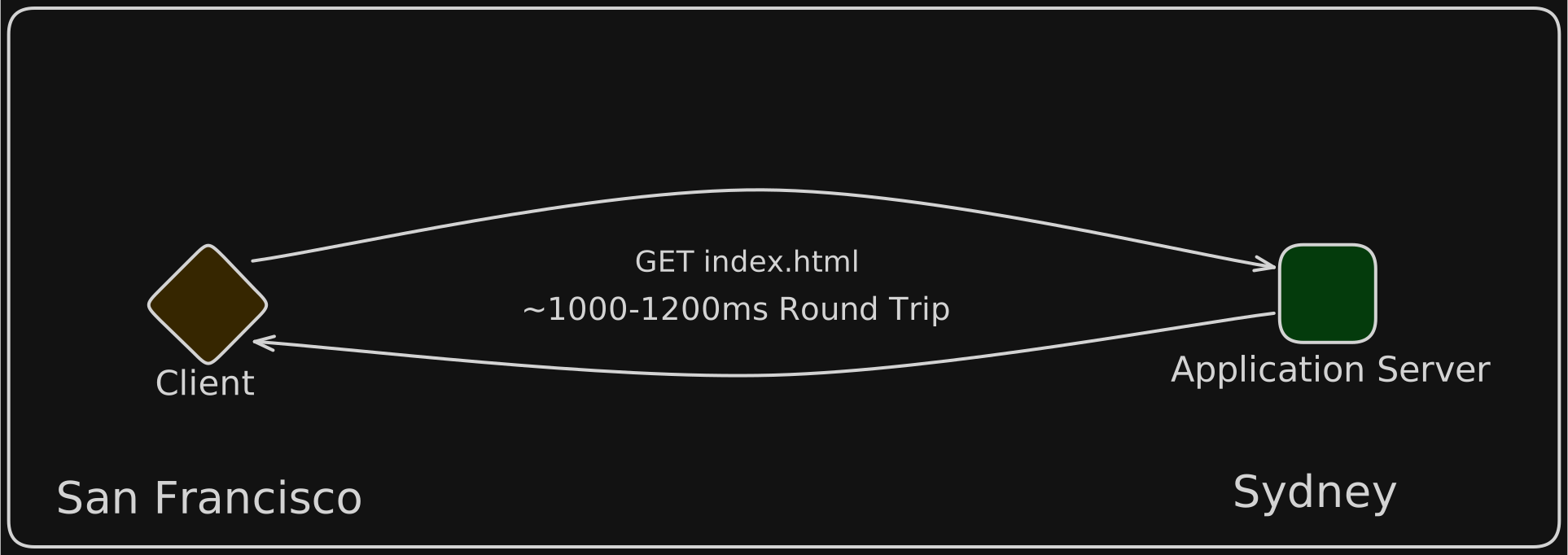
If I run a website based in Sydney, Australia, and a customer from San Francisco opens my site, my server needs to send data halfway around the world before it gets to that customer. You can do all the server-side optimization you want, but the physical distance between these places puts a hard limit on the speed at which you can send content to these users. Unless this is fixed, all the users in San Francisco are going to have a terrible experience. We need more servers to solve this effectively.
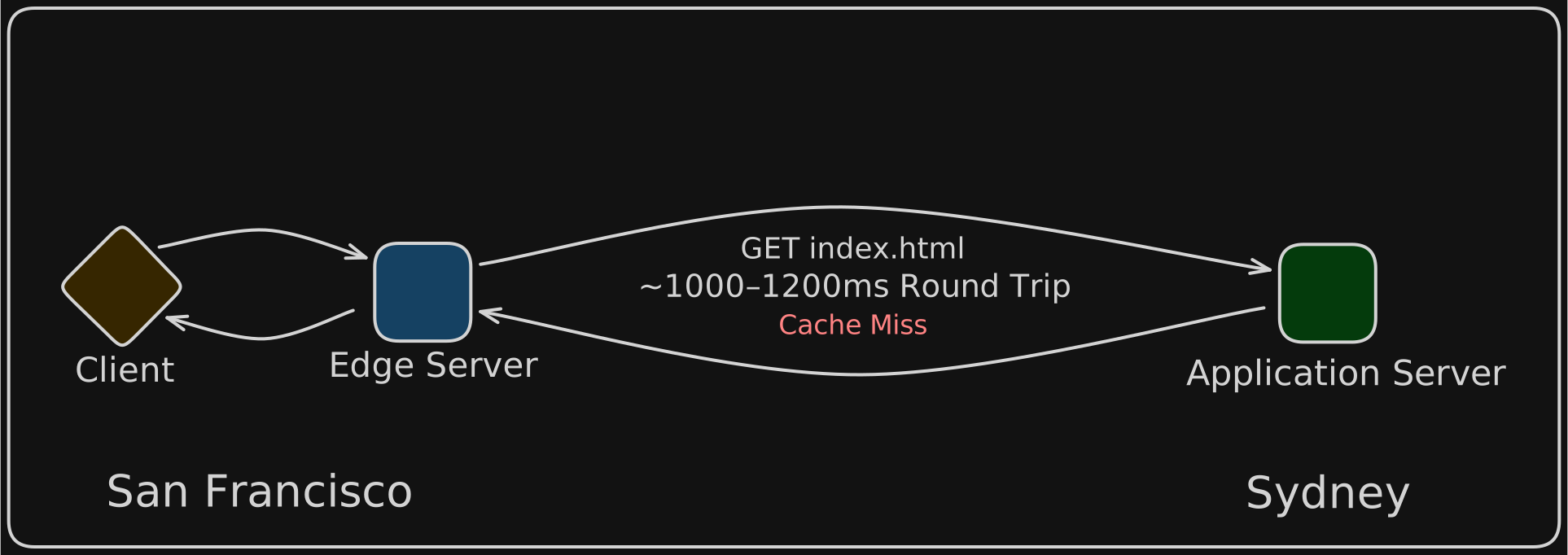
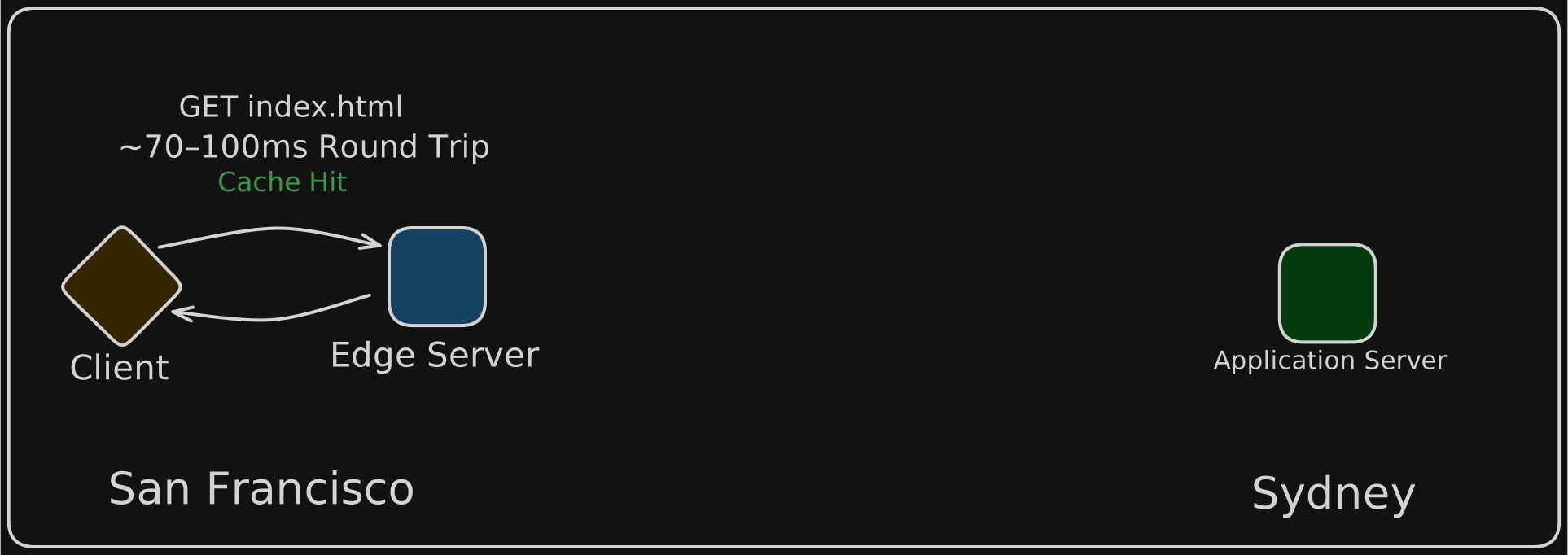
Let’s imagine now that I spin up an “edge” server in San Francisco. My main server that controls all the application logic is still in Sydney, but I now have a point of presence in San Francisco. The sole purpose of this edge server is to cache static assets that aren’t likely to change over time and can be re-used by many customers (think things like HTML and images).
Now if a user in San Francisco makes a request to my website, the request goes to the edge server first. If the user is requesting data that’s already in the cache of the edge server, then the request never leaves San Francisco. The data is immediately served back to the user by the edge server. If the requested data is not in the cache, the edge server forwards the request to the origin server and sends the response back to the client. The edge server also adds the data from the origin server to its cache so that it can be served quickly the next time it’s requested.
This is how CDNs make things fast: users get content from servers that are geographically close, rather than waiting for packets to travel halfway around the world.
Wait, but how do they really work?
In principle this explanation makes a lot of sense, but the more I thought about it, the less I understood about how CDNs were actually implemented. How does the computer of the user in San Francisco know that it should talk to the San Francisco edge server? What stops it from accidentally making requests to an edge server in New York? Or South Africa??
To figure this out, I tried to think through what happens when you visit a website. When you type a domain into your browser, the first thing your computer does is figure out what IP address to connect to. This is accomplished using DNS. So I started wondering: could DNS be involved in the routing somehow? If so, what would I see if I looked up the IP address for a CDN-backed domain?
To do this, I ran dig on dowjones.com, which uses the AWS Cloudfront CDN. This allowed me to see all the IP addresses associated the domain:
; <<>> DiG 9.10.6 <<>> dowjones.com
...
;; ANSWER SECTION:
dowjones.com.        60    IN    A    18.238.192.75
dowjones.com.        60    IN    A    18.238.192.115
dowjones.com.        60    IN    A    18.238.192.28
dowjones.com.        60    IN    A    18.238.192.88
...
Interesting, there were four separate IP addresses exposed by this query. I geolocated these IP addresses using an IP lookup tool, which revealed that the servers were all based in San Francisco. I was naively expecting a globally-distributed list of servers, not just ones based near me in SF.
That got me curious. What would happen if I ran the same query from somewhere else? I booted up a VPN to make it look like I was in London, and ran dig again:
; <<>> DiG 9.10.6 <<>> dowjones.com
...
;; ANSWER SECTION:
dowjones.com.        58    IN    A    3.174.141.29
dowjones.com.        58    IN    A    3.174.141.40
dowjones.com.        58    IN    A    3.174.141.52
dowjones.com.        58    IN    A    3.174.141.55
...
Huh?? Completely different IP addresses. And when I looked these up, they all corresponded to servers in London.
This completely broke my mental model of DNS. I had always thought of DNS as basically a lookup table: you register a domain, you point it at an IP, and that’s what everyone gets. But clearly that’s not what’s happening here. The same query is returning different answers depending on who’s asking.
Something in the DNS system must be making a decision based on my location. But what? And how does it even know where I am?
It’s the Nameserver
The answer requires some high-level knowledge of DNS internals¹. To summarize, when your computer needs to find the IP address for a domain, it sends a query that bounces through a hierarchy of DNS servers until it eventually reaches the authoritative nameserver for that domain. This server has the final say on what IP address to return for your domain.
When you host your website with a provider like AWS, you typically allow them to act as the authoritative nameserver for your domain. So when someone wants to know the IP address of your website, the query eventually makes it an AWS nameserver, and this server is responsible for providing the correct IP address to the requester. You can figure out the authoritative nameserver for a domain by typing dig example.com NS into your terminal.
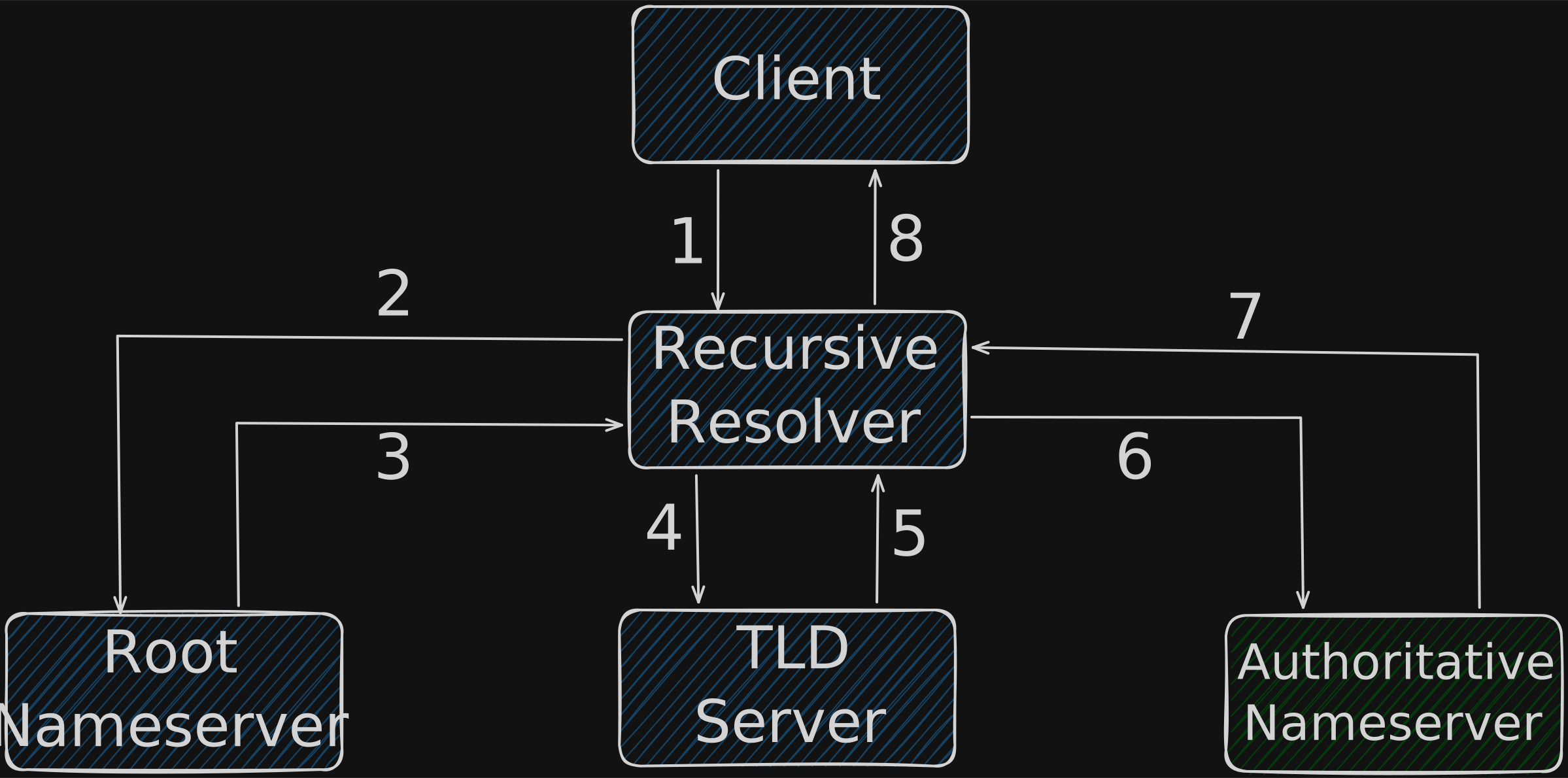
This is the insight that blew my mind: when responding to DNS queries, the authoritative nameserver doesn’t have to return the same IP address every time. It can return whatever it wants. This is super relevant in the context of a CDN. When the nameserver receives a DNS query, it sees the IP address of the machine that made the query², which allows it to figure out roughly where in the world the request originated. It can then decide to return the IP of an edge server that’s close to the requester.
This is why I was seeing completely different answers in my dig query depending on my location. When I made the DNS query from my computer in San Francisco, the nameserver figured out my location, and returned the IP address of the edge servers in San Francisco. The same process took place when I made the query from London.
Building My Own CDN
Once I understood the trick, I wanted to see if I could actually build this logic myself. My goal was to create a minimal CDN with just enough pieces to demonstrate the core concept: a nameserver that routes users to different edges based on their location.
I ended up with three components:
An origin server in Sydney. This is where the actual content lives. I deliberately put it far away from where I’d be testing (San Francisco) so that the latency penalty for cache misses would be obvious.
Two edge servers, one in San Francisco and one in London. These are reverse proxies that cache content. When a request comes in, they check if the requested content is already cached. If yes, they serve it immediately. If not, they fetch it from the origin server in Sydney, cache it, and then serve it.
An authoritative nameserver. This is the interesting part. When a DNS query comes in, this server is responsible for figuring out where the request is coming from, and returning the IP of whichever edge server is closest.
Building the Nameserver
The nameserver is where the magic happens, so let’s start there. Its job is pretty simple when you break it down:
- Listen for incoming DNS queries
- Figure out where the query is coming from
- Determine which edge server is closest to that location
- Send back a DNS response with that edge server’s IP
Here’s the main loop:
if __name__ == "__main__":
    sock = socket.socket(socket.AF_INET, socket.SOCK_DGRAM) # UDP
    sock.bind((HOST, PORT)) # listen on port 53
    reader = geoip2.database.Reader('data/GeoLite2-City.mmdb') # load IP location data
    edge_servers = [EdgeServer(ip, get_ip_coords(ip, reader)) for ip in EDGE_SERVER_IPS]
    while True:
        data, (client_ip, client_port) = sock.recvfrom(512)
        try:
            query_packet = DnsQueryPacket(data)
        except Exception: # don't respond if we receive malformed or non-DNS traffic
            continue
        domain_name = query_packet.question.domain_name
        record_type = query_packet.question.record_type
        logger.info(f"received query for {record_type} record on {domain_name}")
        if (not domain_name.lower().endswith("cdn-test.space")):
            logger.info(f"not authoritative for {domain_name}, refusing query")
            response_packet = build_refused_response(query_packet)
            sock.sendto(response_packet, (client_ip, client_port))
            continue
        # handle A record requests
        if record_type == 1:
            try:
                client_coords = get_ip_coords(client_ip, reader)
                closest_server_ip = find_closest_server(client_coords, edge_servers)
            except Exception as e:
                print(f"Error while finding closest server for client {client_ip}: {e}")
                closest_server_ip = edge_servers[0].ip
            response_packet = build_dns_response(query_packet, closest_server_ip, 50)
        # handle everything else with empty response
        else:
            response_packet = build_empty_response(query_packet)
        sock.sendto(response_packet, (client_ip, client_port))
Instead of using a library, I decided to write my own logic for parsing and sending DNS query and response packets. I lifted most of the logic for these from a different project where I built a DNS client, which I may write an article about at some point. If you’re interested in the implementation details, you can check them out on Github. I heavily referenced the excellent dnsguide repo when building my implementation, and would highly recommend this for further reading on the DNS spec.
There were a few surprising issues³ when building this server, but in general the code is surprisingly straightforward: listen for UDP packets on port 53, parse them as DNS queries, figure out where the client is, respond with the closest edge server’s IP.
Note that this is not a feature-complete nameserver by any stretch of the imagination. If you ask this nameserver for any DNS record aside from an A record, it will return an empty response. However, it turns out that you don’t need to implement the full DNS spec to have a functioning nameserver, so I kept it as simple as possible for my toy CDN.
GeoIP: Turning IPs into Locations
To figure out the client’s location, I used MaxMind’s GeoLite2 database. This is a free database that maps IP addresses to approximate geographic coordinates. You give it an IP, it gives you back a latitude and longitude.
def get_ip_coords(ip_addr: str, db_reader: geoip2.database.Reader) -> Tuple[float, float]:
    response = db_reader.city(ip_addr)
    if (not response.location.latitude) or (not response.location.longitude):
        raise Exception(f"Failed to retrieve coordinates for IP address {ip_addr}")
    return (response.location.latitude, response.location.longitude)
These databases aren’t perfect. They’re built from IP registration data and various heuristics, so sometimes they’re off by quite a bit. But for my purposes, I don’t need to know exactly where someone is. I just need to know if they’re closer to San Francisco or London, and for that level of granularity, GeoLite2 works great.
Finding the Closest Server
Once I have coordinates for the client, I need to figure out which edge server is closest. This is a geometry problem: given a point on a sphere (the client’s location) and a list of other points (my edge servers), which one is nearest?
I used the haversine formula, which calculates the great-circle distance between two points on Earth’s surface:
import math
from haversine import haversine
def find_closest_server(client_coords: Tuple[float, float], edge_servers: list[EdgeServer]) -> str:
    closest_server_ip = ""
    minimum_distance = math.inf
    for server in edge_servers:
        distance = haversine(client_coords, server.coords)
        if distance < minimum_distance:
            closest_server_ip = server.ip
            minimum_distance = distance
    return closest_server_ip
Now when a DNS query comes in from an IP that geolocates to somewhere in the United States, this function returns the San Francisco edge server’s IP. If the query comes from somewhere in Europe, it returns London.
The Edge Servers
The edge servers have two jobs: serve cached content, and forward the request to the origin server if the content is not in cache.
To handle this, I chose to use Caddy as my reverse proxy. It’s very easy to set up compared to something like Nginx, and it handles TLS automatically. The catch is that Caddy doesn’t have built-in caching, so you need the cache-handler plugin. This is the Caddyfile I ended up using:
{
    cache {
        ttl 30s
    }
}
:80 {
    header X-Edge-Server {$EDGE_REGION}
    cache
    reverse_proxy {$ORIGIN_HOST}:80
}
cdn-test.space, www.cdn-test.space {
    header X-Edge-Server {$EDGE_REGION}
    cache
    reverse_proxy {$ORIGIN_HOST}:80
}
On a cache miss, Caddy fetches from the origin and stores the response. On a cache hit, it serves immediately. The Cache-Status header tells us which happened, and that’s what powers the demo UI sent from the origin server.
The Origin Server
The origin server is an HTTP server that serves static files. I used Python’s built-in http.server module because I didn’t need anything fancy. It serves a static webpage and a high-resolution image, both of which can be cached by my edge servers.
I wanted cache misses to be noticeably slow so that the benefit of caching would be obvious, so I decided to put the origin server in Sydney, Australia. Sydney is about 12,000 km from San Francisco, which translated to roughly 1000–1200ms of round-trip latency when fetching a high resolution image in my testing. That’s enough to feel sluggish without being comically slow.
Putting It All Together
To keep things reproducible (and easy to tear down when I was done), I containerized all the servers using Docker and provisioned the infrastructure on DigitalOcean using Terraform. After deploying it all and configuring the custom nameserver with my domain registrar, I was ready to test out the CDN. Here’s what happens when you load the demo and click “Fetch Image”:
First request (cache miss):
- Browser looks up
cdn-test.space - My nameserver sees the query is from California, returns the SF edge IP
- Browser connects to SF edge
- Edge doesn’t have the image cached, fetches from the Sydney origin
- Round trip to Sydney + response = ~1100ms
- Edge caches the response
Second request (cache hit):
- Browser already has the DNS result cached
- Connects to SF edge
- Edge has the image cached, returns immediately
- ~100ms
If I were to instead make this request from London, a similar process would occur with the edge server in London.
What Real CDNs Do Differently
This project captures the core idea behind a CDN: route users to the closest edge server and cache content aggressively on this server. However, I’d be remiss if I didn’t also mention how large CDNs like Cloudflare and AWS Cloudfront work at scale.
In my implementation, traffic is steered at the DNS layer. The authoritative nameserver examines the source of a DNS query and returns the IP address of an edge server that appears geographically close to the requester. This model is straightforward, effective, and still common in real-world deployments.
Large CDNs often add another layer of steering beneath DNS using a routing technique called anycast. With anycast, multiple edge locations advertise the same IP prefix via BGP. From the perspective of the internet, there is a single IP address. In reality, that prefix is announced from many physical locations. The global routing system determines which announcement receives traffic based on BGP’s path selection rules.
This shifts part of the routing decision from the DNS layer to the network layer. The two approaches aren’t mutually exclusive, and many large CDNs combine them. DNS may determine which CDN network you enter, while BGP determines which physical edge location ultimately handles your packets.
What I Learned
Building this project connected a few things that hadn’t quite clicked for me before. I’ve set up DNS records for a few websites in the past, but I had always assumed these records were static and unchanging. In reality, I now understand that DNS is a programmable control plane. The answer to “what IP should this domain resolve to?” can depend on who is asking, where they are, or even what time it is.
It also made me appreciate why enabling a CDN feels so effortless when using a cloud provider. When you delegate authoritative DNS to AWS or Cloudflare, you’re handing over control of your domain’s control plane. They can dynamically decide which IP addresses your domain resolves to, whether that’s an origin server, an edge cache, or an entire anycast network.
My toy CDN doesn’t have the scale or resilience of a production CDN, but building it from scratch made the abstraction more transparent. And once you see how traffic is actually steered, it gives you a bit more appreciation for the engineering effort that’s gone into making things load faster on the internet.
If you want to check out how I implemented this, or deploy your own toy CDN, the code is available on Github. Thanks for reading!
Footnotes
- A full explanation of how DNS works is out of scope for this article. For a primer I’d recommend checking out a few articles online (like this one), have also heard good things about this book.
- Technically the authoritative nameserver sees the IP address of the recursive resolver making the DNS query, not the IP address of the client that initiated the request. This can introduce inaccuracies unless extensions like EDNS Client Subnet are used.
- I only wanted to respond to DNS queries for my domain, cdn-test.space, so I was originally doing a case-sensitive string match on the domain in the DNS query. However, I was getting some freaky-looking domain names like cDn-TEsT.sPaCe in the query packets, and was incorrectly rejecting them. It turns out this is a security measure known as DNS 0x20 bit encoding that’s meant to prevent DNS cache poisoning attacks. Interestingly, this was implemented by the recursive resolvers for Google and Cloudflare, but not Comcast. Step it up Comcast!