Coding the "World's Fastest Scrabble Program"
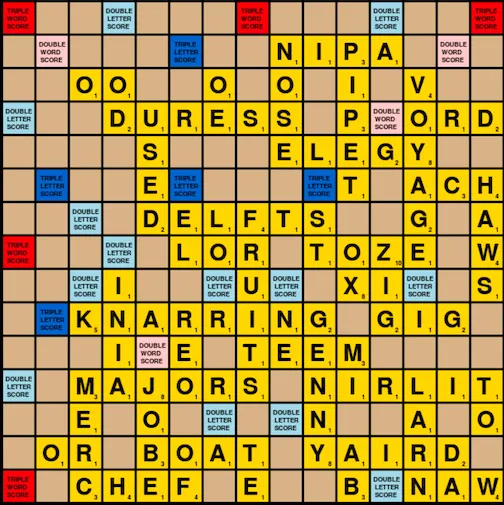
Board game AI serves as an excellent proving ground for programmers trying to test their abilities. Recently I was looking for a new project and realized during a game of Scrabble that the game might be the perfect opportunity to apply some computer science knowledge. I figured it would be in the intermediate level of difficulty, not as simple as Connect 4 and not as complex as Chess. After some searching, I found a paper with the intriguing title of “The World’s Fastest Scrabble Program” by Andrew Appel and Guy Jacobsen. It’s only eight pages long, but it describes all the algorithms and data structures needed to create a powerful Scrabble opponent. It looked challenging enough for someone at my level to be just barely doable. With that in mind, I read the paper over a few times and got started on my implementation.
Before going any further, I’d like to note some peculiarities of the Scrabble dictionary. While the Oxford English Dictionary contains about 171,476 words, the Scrabble dictionary contains a staggering 279,496. This means that a large proportion of valid Scrabble words are actually completely made up. Some of my personal favorites are “eeven” and “zzz”. It’s important to note that the Scrabble dictionary especially likes made-up two-letter words like “et” and “za”. This is all in the name of helping players score more points, but it can be confusing to the uninitiated.
Project Scope
I decided to divide the project into two separate phases.
- Create a data structure to store the entire Scrabble dictionary in a compact and searchable manner.
- Implement the paper’s word generation algorithm to return all possible moves given a board state and rack of tiles.
Dictionary
It is actually fairly easy to convert a dictionary into a data structure using something called a trie. A trie is just a tree with its edges labeled by letters. To add words to a trie, simply start at the root node. If the first letter of the word is already contained in the edges of the root node, then follow that edge to the next node. Repeat this with subsequent letters until you reach a node whose edges do not contain the letter of the word. At this point, create a new edge using the missing letter and branch out to a new node. Once you reach the end of a word, mark the final node as terminal.
By repeating this procedure, we can convert an entire dictionary of words into a trie.
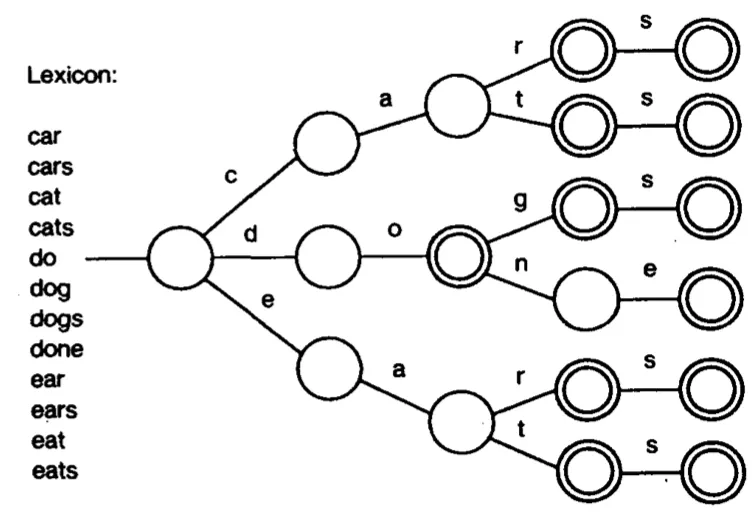
At this point we are able to look up any word in the dictionary. Simply follow the edges of the trie until you get to the end of the word. If at some point in the process you’re unable to find an edge corresponding to the letter of the word, then the word is not in the dictionary. Also, if you get to the end of the word and the node is not terminal, the word is not in the dictionary.
The trie data structure is easy to understand and easy to code. As the authors of the paper point out, it also takes up a lot of space. When I converted the Scrabble dictionary into a trie, it required 612,024 nodes. This translated to 12.4 MB of space. When the paper was written in 1988, memory limitations made the trie infeasible for a Scrabble application. However, modern computers can easily create and use this trie without any optimization.
Despite this, I decided to implement the authors’ substitute for the trie: the Directed Acyclic Word Graph (DAWG). The DAWG recognizes that if two words have different prefixes but share the same suffix, then they can both share the same nodes for their suffix. For example, “car” and “ear” both share the “ar” suffix. In the trie above these words do not share any common nodes. By contrast, in the DAWG below, the root node simply points “c” and “e” to the same common node.
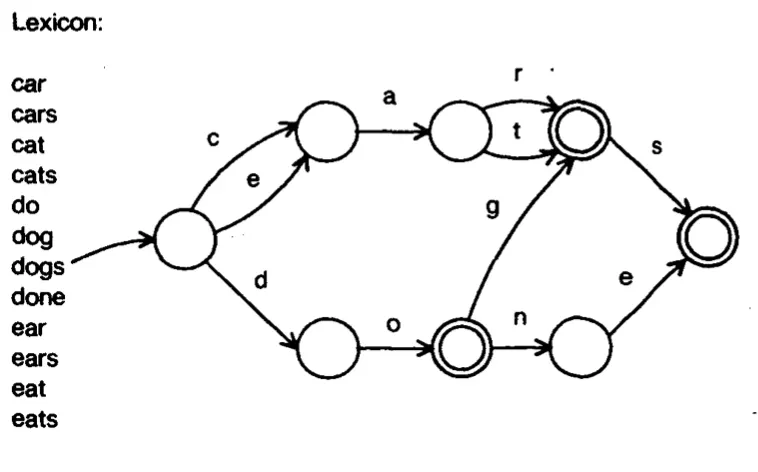
To actually code a DAWG I had to look outside the Appel and Jacobsen paper. I found two excellent descriptions of the procedure written by Jean-Bernard Pellerin and Steve Hanov. Pellerin’s has a graphic that I found very helpful in demonstrating how the algorithm works. I’ll provide my own description of the procedure as well.
To construct a DAWG, start with a root node and add the first word exactly the same way as you add a word to a trie. Once the end of that word is reached, keep track of the final node. When adding the next word, compare it to the previous word and see if they share a common prefix. Once that common prefix is identified, iterate backwards from the final node to the node where the words share the prefix. At each iteration, call a minimization function.
Minimization is defined as follows: Move to the node’s parent. Call this node “Current”. Then check to see if there is already a “Target” node in the DAWG that satisfies the following criteria:
- Has the same terminal state as Current.
- For every outgoing edge, its nodes point to the same nodes as Current.
If such Target is found, then change the edge coming from Current to point at the Target instead of its former child.
Once minimization has been called on all relevant nodes, we should be at the part of the DAWG where the shared prefix between the two words ends. Add the remaining letters of the new word to the DAWG in the exact same way as the letters of the first word were added. Repeating this process for an entire dictionary leads to a DAWG like the one pictured above.
Implementing this change on a large scale produces impressive memory savings. The Scrabble Dictionary consumes 12.4 MB as a trie, and only 3.8 MB as a DAWG while encoding the exact same information!
Word Creation
Words can be inserted both vertically and horizontally in Scrabble. Playing a vertical word can be considered identical to playing a horizontal word on a transposed board. Thus, we will consider only playing words horizontally, but on both a regular and a transposed board state.
When playing a word in Scrabble, players need to ensure that the tiles they place also form valid vertical words if they are directly above or below tiles already on the board. This requires one to evaluate multiple rows every time a word is inserted. Appel and Jacobsen realized that instead of dynamically checking which letters were allowed at a given square each turn, the algorithm could instead precompute these letters for every tile. To do this, we give every square on the board a “cross-check set”. This is a list that contains all the letters that are allowed to be placed on a given square. Initially, every square on the board is assigned a cross-check set containing every letter of the alphabet. Then, when a word is placed on the board, we update the cross-check sets for every tile directly above and below the placed word. Any letter that does not form a valid vertical two-letter word when played horizontally is excluded from the cross-check set. Additionally, we place empty cross-check sets at the squares immediately preceding and ending a word to prevent words from being written on top of them. Cross-checks allow the computer to evaluate a single row during word generation, reducing the task from two dimensions to one.
Note that horizontal cross-checks are irrelevant if one is trying to insert a word vertically. Thus, it is necessary to maintain two different cross-check sets depending on if the board is in a transposed or a non-transposed state.
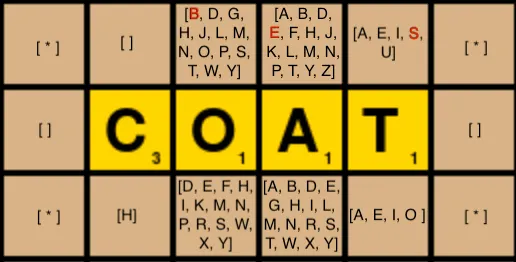
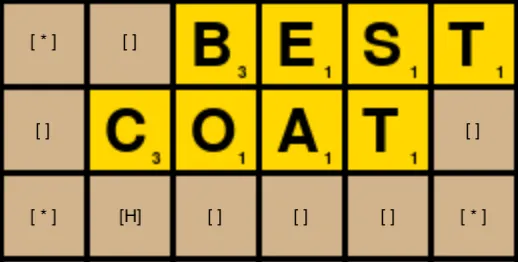
Since all words placed in Scrabble (with the exception of the first word) must be built on a previously-existing word, we can look to “anchor” newly placed words against a tile that’s already on the board. When placing a word horizontally, the “anchor square” will either be directly to the left or directly to the right of a tile that’s already on the board. Once an anchor square is selected, we use the following recursive backtracking procedure to generate all possible words:
- Find all possible prefixes of a word anchored at a given anchor square.
- For each valid prefix, find all matching suffixes.
I think it’s helpful to consider how the algorithm generates the suffix of a word before moving on to the prefix. To do so, let’s consider a scenario where the prefix begins with a letter already on the board. In the example below, our starting letter is K. When placing letters from our tile rack, they must be elements of the sub-DAWG rooted at K. Also, letters must be in the cross-check set of whatever square they are being placed into. Using these two requirements, we can build all valid suffixes starting from K.
There are a few additional details to be noted in the code for suffix generation. If during the traversal of the sub-DAWG we encounter a terminal node, then we have created a valid word. We will keep track of all valid words and choose to play the highest-scoring word.
Also, if during suffix generation we encounter a tile that’s already on the board, the algorithm should try to include that tile in the suffix.
With a solid understanding of suffix generation, prefix generation is easy. We just create all possible prefixes using the anchor square, and then try to extend those prefixes into complete words using the suffix generation function.
Final Product
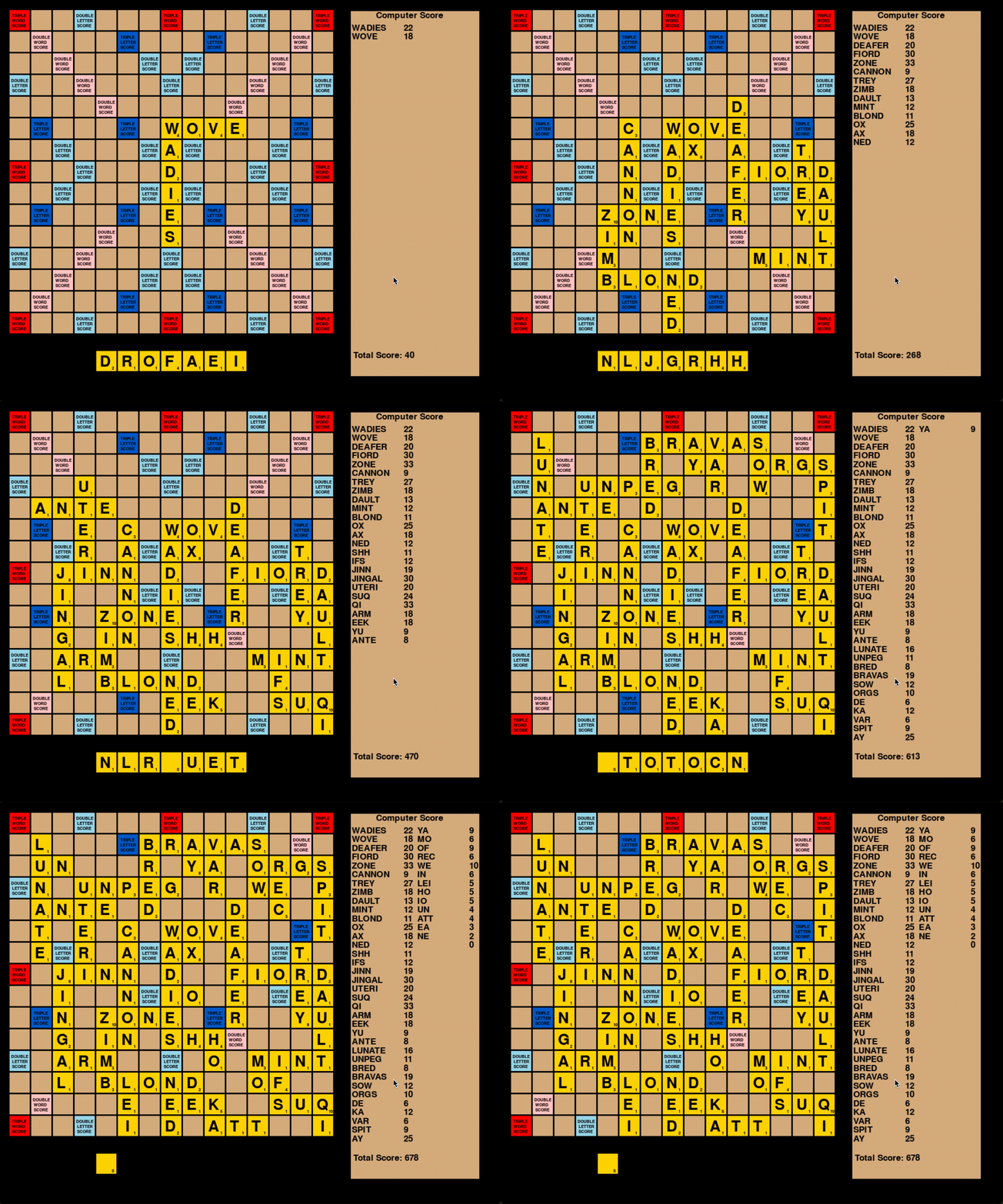
To pull it all together, I wrote a visualization of the board using the Pygame module. I also wrote a validation function to ensure that the computer wasn’t playing any incorrect words. I stress-tested the algorithm by having two computer opponents play 1000 games against each other and calling the validation function at the end of each game.
At the end of 1000 games, the mean total game score hovered around 710, meaning that on average both computer players scored over 355 points. This puts the algorithm well above the typical Scrabble player.
Future Work
Although this algorithm successfully generates high-scoring Scrabble games, there are a number of improvements that could be implemented to further refine it. One that immediately comes to mind is improving the heuristic used by the algorithm to select which word to play. Currently, the algorithm plays the highest-scoring word it can find on any given turn. This approach is similar to the way most people play the game. However, Scrabble players at the highest level use a different approach. Players receive a 50 point bonus called a “bingo” if they manage to use all the tiles in their rack on a single turn. Professional players seek to maximize the amount of bingos they get. This article from Insider suggests a variety of ways to optimize for maximum bingos.
Another potential improvement could be improving the way cross-check sets are generated. Currently, once a two-letter word is created using a cross-check set, the algorithm is forbidden from building any higher horizontally. I’m not sure how to do this in a computationally expedient way, but ideally cross-checks could extend to three and four-letter words instead of just two-letter words.
Conclusion
I learned a lot by implementing “The World’s Fastest Scrabble Program”. This was my first large self-directed project, and I think the biggest challenge was just figuring out how to architect my code. It felt like design decisions made at the start of the process became impossible to reverse once I had layered more code on top of them. If I could rewrite the whole thing from scratch, there are definitely a few things I would do differently. That said, if you want to play with the program yourself, my implementation is available on Github.